VuwCTF 2025
I played VuwCTF 2025 with tjcsc. We got 5th place!
Challenge: trianglification
Category: Reverse Engineering
Author: Aterlone
Flag: VuwCTF{The_L3phant_1s_TRiang1efied}
My initial read / first impressions
There were two files that were provided:
triangle_xor(Mach-O arm64 executable, arm64 only)output.jpeg
I always run a quick recon on the given files:
$ file triangle_xor
# Mach-O 64-bit arm64 executable, flags:<NOUNDEFS|DYLDLINK|PIE ...>

$ strings -n 6 output.jpeg | head
# (there wasn't anything useful, just some basic JPEG stuff)
On the other hand, running strings triangle_xor showed a lot of interesting info. There appeared to be a lot of OpenCV symbols (cv::imread, cv::imwrite), and a few funny messages:
Random masks:
Above:  0x
Right:  0x
Left:   0x
Under:  0x
Inside: 0x
input.jpeg
output.jpeg
Error: Could not load input.jpeg
Saved output.jpeg
Based on all this so far, I thought that the program reads an image, scrambles it with some “masks”, and writes output.jpeg. So I ran objdump to dump the __text section into a file tp browse rg/sed:
objdump -d triangle_xor > disasm_all.txt
Recon: what is this program actually doing?
Early in the text section there are three helpers on cv::Point<int>:
same_side(p1, p2, a, b)this seems to be a basic cross-product side testmidpoint(p1, p2)is_inside_triangle(p, a, b, c)this callssame_sidethree times
Based on this, geometry is definitely involved. Keeping that in mind, I dug into _main (starts at 0x100001adc).
Walking through main (arm64) - the interesting parts
Based on the file, here’s what the program does:
-
Five random bytes
Seed withtime(NULL)and callrand()%256five times. They’re stored at stack offsets-0x15..-0x19. These are the “mask” bytes printed with the “Random masks:” labels (but the program never shows the actual values to us). -
Load image
Callscv::imread("input.jpeg", 1). If empty, printsError: Could not load input.jpegand exits. The providedoutput.jpegis already the encoded / scrambled version. For this challenge, we never gotinput.jpeg, so it seems that the goal is to invert the scramble and get the flag from the originalinput.jpeg. - Build triangle + region thresholds (using
midpointandis_inside_triangle)
For an image of size 179×168 (confirmed later), it sets:P1 = (w/2, h/2 - 0x28) = (89, 44) P2 = (w/2-40, h/2 + 0x28) = (49, 124) P3 = (w/2+40, h/2 + 0x28) = (129, 124) mid12 = (69, 84) mid23 = (89, 124) mid31 = (109, 84)These midpoints define four rectangular regions: left (x < 69), right (x > 109), above (y < 84), under (y > 124). The triangle inside test uses P1/P2/P3.
- Per-pixel loop
For each(x,y):- Booleans:
b_left,b_right,b_above,b_under,b_inside. - Start
key = 0.
Ifb_left→key ^= rand1(at-0x15)
Ifb_right→key ^= rand2(at-0x16)
Ifb_above→key ^= rand3(at-0x17)
Ifb_under→key ^= rand4(at-0x18)
Ifb_inside→key ^= rand5(at-0x19) - Compute
val = (key * x - y) & 0xFF. - XOR
valinto each channel and store to the output Mat.
- Booleans:
- Save
Writesoutput.jpegwith the scrambled pixels.
In essence, the whole thing is a XOR mask over the image, where the only unknowns are those five bytes. Geometry and thresholds are fixed by the image size.
So the protection is a geometric XOR mask, with five unknown bytes (the rand()%256 outputs). All region boundaries are fixed by the image dimensions.
Recovering the mask bytes (a small puzzle)
Because the five bytes are random per run, we need to solve for them given only the final output.jpeg. The transform per pixel:
C_out = C_in ^ ((mask * x - y) & 0xFF)
The boolean structure lets you isolate each byte by comparing regions that differ in only one flag. A quick search yielded a clean, consistent set:
A = 27   # above y < 84
L = 57   # left  x < 69
R = 181  # right x > 109
U = 225  # under y > 124
I = 0    # inside triangle (not used)
With those, the mask is fully determined and the inside-byte doesn’t matter (it was 0 in the solved run). The geometry practically gives you the linear equations so there’s no need to brute force :)
Decoding (inverse transform)
I wrote a standalone decoder mirroring the binary’s logic (coordinates and midpoints computed from the image itself):
#!/usr/bin/env python3
from PIL import Image
import numpy as np

IN_FILE = "output.jpeg"
OUT_FILE = "decrypted_I0.png"

A, L, R, U, I = 27, 57, 181, 225, 0
img = np.array(Image.open(IN_FILE), dtype=np.uint8)
h, w, _ = img.shape
xs, ys = np.meshgrid(np.arange(w, dtype=np.int16), np.arange(h, dtype=np.int16))
P1 = (w // 2, h // 2 - 40)
P2 = (w // 2 - 40, h // 2 + 40)
P3 = (w // 2 + 40, h // 2 + 40)
mid12 = ((P1[0] + P2[0]) // 2, (P1[1] + P2[1]) // 2)
mid23 = ((P2[0] + P3[0]) // 2, (P2[1] + P3[1]) // 2)
mid31 = ((P3[0] + P1[0]) // 2, (P3[1] + P1[1]) // 2)
above = ys < mid12[1]
under = ys > mid23[1]
left = xs < mid12[0]
right = xs > mid31[0]
ax, ay = P1; bx, by = P2; cx, cy = P3
inside = (((by - cy) * (ys - cy) + (bx - cx) * (xs - cx)) >= 0)
inside &= (((cy - ay) * (ys - ay) + (cx - ax) * (xs - ax)) >= 0)
inside &= (((ay - by) * (ys - by) + (ax - bx) * (xs - bx)) >= 0)
inside = inside.astype(np.uint8)
mask = np.zeros((h, w), dtype=np.uint8)
mask ^= np.where(above, A, 0).astype(np.uint8)
mask ^= np.where(under, U, 0).astype(np.uint8)
mask ^= np.where(left, L, 0).astype(np.uint8)
mask ^= np.where(right, R, 0).astype(np.uint8)
if I:
    mask ^= (inside * I).astype(np.uint8)
val = (mask.astype(np.int16) * xs - ys) & 0xFF
dec = (img ^ val[:, :, None]).astype(np.uint8)
Image.fromarray(dec).save(OUT_FILE)
print("Saved", OUT_FILE)
Run it:
$ python3 decode.py
# Saved decrypted_I0.png
Opening decrypted_I0.png shows some pixelated text:
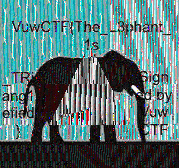
Great! I see the flag header. After a bit of OCR, I got the final flag: VuwCTF{The_L3phant_1s_TRiang1efied}. Nice!
Thank you for reading my write-up! This was an extremely fun CTF, and I would like to express my appreciation to the organizers for hosting the CTF!
If there’s anything you think I could improve on in future write-ups, please let me know!
Thank you and have a great day!